
An Xcode C++ Client-Server Development Trick
I’m working on a C++ product that has a series of client executables that need to talk to a server executable. And they all share a lot of common code.
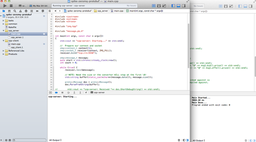
The traditional approach to build and debug this pattern is to create a library of the common code in one project, a separate server project and another client project, then jump between windows to edit and compile where needed.
But I am often coding on my trusty 13" MacBook Air screen and it’s just too tiny to have all these Xcode windows open with their console windows visible. I even prefer this on the 27" Display where I can see documentation and other windows nearby.
WordCounter


WordCounter by Christian Tietze (@ctietze) does one thing, and does it well:
It counts the number of words you type in registered applications and displays the total on the menu bar.
Most writers I know use several different software tools while writing, like nvAlt for notes, Byword for short pieces and Scrivener for the big things. But each of these has a separate word count (if at all). WordCounter brings them all together in one. Perfect!
Sonicwall Mobile Connect for OS X Mavericks
If you are running OS X 10.8 or lower, please refer to SonicWall NetExtender for OS X Mavericks, this only works for 10.9 Mavericks and above.
Step 1: Download from the App Store
It’s available here: Sonicwall Mobile Connect.
There is no Step 2.
The best part of this new edition is that this is a real OS X app and it integrates with Apple’s VPN settings.
Which means you only need to run it once, to set up and test the VPN connection. After that, you can access it from the Network System Preference or the VPN menu at any time.
They will not come
“If you build it, they will come” – Field of Dreams
On Monday night, June 30, 2014, I’ll be taking the Kifu servers down and putting up a static sunset site.
I built it, they did not come. It’s time to go dark.
I know we built it right. We spent years looking at the market for non-profit management systems and found thousands and thousands of potential customers publicly expressing real needs. We met with many, many different kinds of non-profits to talk about that they needed, and with even more to talk about what we could do. We tested the idea, refined it and sought out more to talk with. We did this for three years. Only then did my partners and I decide to go ahead, set up a company and do it.
On the floor
At least once a month, step out of your cubicle or office and spend a day on the floor. It will make you a better software designer and developer, it will help you make better software for the folks on the floor, and it will build a better relationship with them so issues and ideas can flow.
I spent Friday on the floor of my work. As I do at least once a month. My software and their workflows are significantly better for it.
Upgrading Octopress to Jekyll 2.0
So this happened today:
Octopress 2 is now using the latest and greatest Jekyll 2.0.3.
Now, back to work on Octopress 3. Happy blogging!
— Octopress (@octopress) June 21, 2014I’ve been waiting for this. Now that it has, I decided to finally upgrade this site.
It was easy. As per Updating Octopress, I just ran:
git pull octopress master
Then, to ensure all gems were up to date, I ran
bundle update
Finally, I got ready - update source, clean caches and generate the blog. Note that I chose not to update the style as I like my SASS changes.
Server-sided Swift Speculation
Note: This is not a thing, it’s just some idle speculation on my behalf. But maybe, just maybe, Apple will do something like this. Or not. Maybe we will do it.

This week at WWDC, Apple surprised the developer world with their new programming language, Swift. And astoundingly, it’s almost ready for prime time Mac and iOS client software development already.
I would very much like to use a language like Apple’s new Swift on the server side as well. I suspect that we may get some of what we need there, if not all.
Omnifocus My Way

I’ve been using OmniFocus as my primary tool for task management for years, yet I never read the GTD book. How I chose OmniFocus is a topic for another day, how I use it my way is the topic for today. Maybe some of the alternative ways I use it can improve the way you do too.
My World
I’m a software designer, developer, project manager and part-time writer. I work at a Hedge Fund by day, run my consulting firm at night, write this blog and have a personal life. As of writing this post, I have 260 active line items in OmniFocus. That is a lot of things to stay on top of.
Solve Tab Hell with Fluid and ChoosyOSX
More and more of our data, applications, communications, reading and work happens via a browser tab on the internet. I don’t know about you but I often have several browser windows open on several virtual desktops all with multiple tabs open.
And I can never find a thing.
So I open a new tab. And start again. Tab hell.
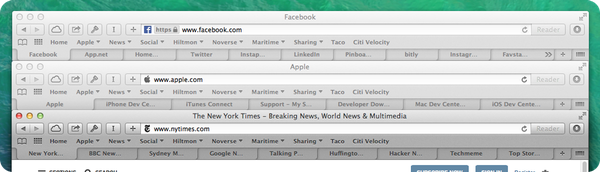
Now this is fine for reading or browsing - you just walk the tabs to see what you were looking at. But for work, when you need to go to a specific web application that you just know you have open somewhere, it becomes a bother. You have to go to each browser window, walk the tabs, switch desktops, walk more. It’s too slow and unproductive.
Melding Scrivener and Marked
If you are a regular reader of this blog, you will know that I do all my writing using Markdown format, short-form in Byword, long-form in Scrivener and generate the final document using Marked.
In short: I write all my work documents, including letters, reports and software documentation in Markdown formatted text files and then format them using Marked and a standard stylesheet (See Letterhead - Markdown Style for how that works). See The Markdown Payoff for why.