
Freemium Simulation Games prove Stupidity
I don’t get the allure and popularity of freemium time-based simulation games like Farmville, DragonVale, Tap Zoo, and Smurfs Village. Yet these games are the top grossing games on the App Store. So I decided to take one on to see if I can find the ‘it’ factor that makes these games so enjoyable, popular and profitable, without paying real money to short-circuit the game.
tl;dr (Too Long; Didn’t Read): You have got to be out of your mind to find these ‘games’ enjoyable or worth spending money on. They are slow, skill and challenge lacking, chore-based, time-draining, naggy, annoying proofs of stupidity. The only conclusion I can draw from this experience is that people don’t value their time, have no self-respect and are just plain stupid to be playing and spending money on these products. “Men in Black” got it right: “A person is smart. People are dumb, panicky, dangerous animals and you know it”.
Giving yourself away with a Facebook Login
Applications that require a Facebook login are doing so to gain access to you, your name, your friends, your location, your personal details. They are not using the login because they are too lazy to create their own. Hilton Lipschitz, right here right now
My wife asked me why I deleted Draw Something this week, as we were both enjoying drawing pictures with each other. I told her that Zynga purchased them, who Zynga were and why I did not want them to have access to my information. See Facebook and Zynga Face Lawsuits over Privacy Breach and Facebook in Privacy Breach from the WSJ alone.
Clarity
Jason Fried, on the 37 Signals blog, sums it up in What clarity is all about:
Lots of people think simplicity is the opposite of confusion (“It’s confusing, let’s make this simpler”). It’s not. The opposite of confusion is clarity.
Markdown Quick Look
If you use markdown like I do on a Mac, you may notice that Quick Look does not render .markdown files as documents, instead providing an icon only. If you have tools like iAWriter installed (I used to), they install a Quick Look plugin, and the markdown is rendered readable.
For the rest of us, Brett Terpstra of Marked and nvAlt fame has released an update to Fletcher Penney’s Quick Look generator.
Check it out at Multimarkdown Quick Look With Style. I’m using it.
2012 iPad Essentials
Editor’s Note: This was written way back in March 2012 with the launch of the iPad 3. For updates see 2012 Year End iPad Essentials.
The new iPad arrived yesterday. Instead of restoring from a backup, I decided to build it clean and install only essential apps. Here are the ones (excluding games) that made it in the first 24 hours, pretty much in order of addition:
- iBooks - I read a lot of ePub books on the iPad, and the new retina text rendering is so great.
- Instapaper - Essential tool to save, search and read long form writing found on the net. Use it to archive all the cool articles I find.
- TweetBot - The best twitter client out there, even better than my old favorite Twitterrific. Love the UI and the gap detection.
- Reeder - Lovely RSS reader, for all my news and technology feeds.
- FlipBoard - More news, from sources not followed in RSS.
- Zite - Even more reading material, should I run out of the above.
- Skype - For those who do not use Facetime.
- Facebook - Cause I gotta share.
- Keynote, Numbers and Pages - I have to iWork too. Most of my demos these days are on the iPad, and Keynote rocks.
- iMovie, iPhoto and Garageband - So I can create, or play, or annoy.
- OmniFocus - to keep me on track and remind me what I need to get done, synched across all my iDevices.
- DayOne - to remember what I did.
- Byword - to view and create notes, and write, replacing Elements for notes.
- Penultimate - scribble notes, or draw diagrams to support my points, it’s my scratchpad.
- xScope Mirror - to see how things look from the Mac.
- TextExpander - to share my expansions, especially for notes.
- Prompt - to get to servers when I need to, when Murphy’s Law strikes.
- Textastic - so I can edit code anywhere, this is my “Emergency: Break Glass” app after Prompt.
- Yojimbo - Key document and information backup.
- 1Password - Of course
- Soulver - A better calculation tool.
Of course, Mail, FaceTime, iMessage and iTunes Match were set up first.
With In-App Coins, We're all Losers
There are a lot of games on the iPhone App Store that offer in-app purchases of game currency in order to enable players to either speed up the game, or to buy their way to higher levels, without adding additional content. Many of these games are offered free (the freemium model), but make it difficult to play unless you buy these in-app coins.
If you do this, you are a loser.
If you do this, I too become a loser.
And I don’t like being a loser!
First impressions of the new iPad
In short, between the iPad 2 and the new iPad (retina):
- Weight: Same
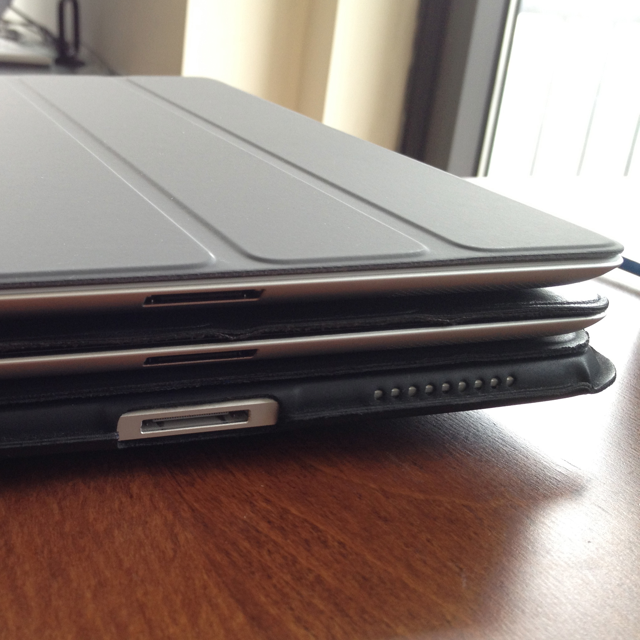
- Thickness: Same
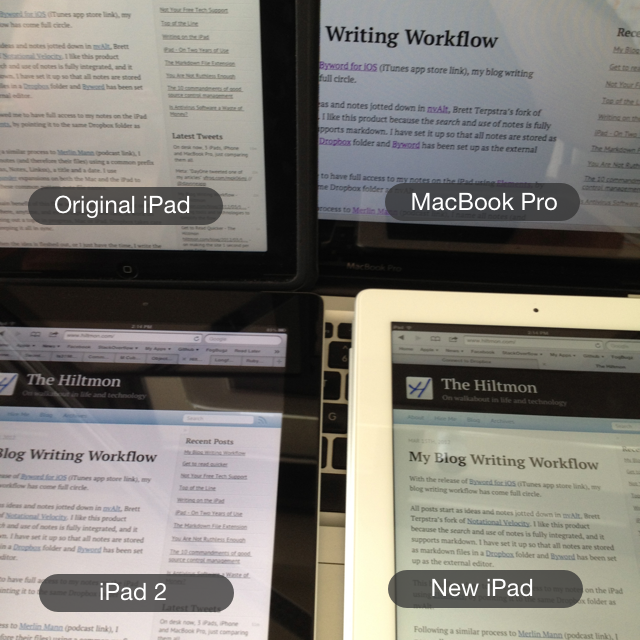
- Screen: Yowser! The old screen looks pixellated and blurry, the new screen is brilliant. Also a lot warmer.
- Performance: Same
Between the original and the new iPad (retina):
- Weight: Oh, so much lighter
- Thickness: Oh, so much thinner
- Screen: As above, but the original was warmer than the iPad 2.
- Performance: Blazingly faster, yet the original is still no slouch.
Comparing the Screens
Comparing the Thickness
My Blog Writing Workflow
With the release of Byword for iOS (iTunes app store link), my blog writing workflow has come full circle.
All posts start as ideas and notes jotted down in nvAlt, Brett Terpstra’s fork of Notational Velocity. I like this product because the search and use of notes is fully integrated, and it supports markdown. I have set it up so that all notes are stored as markdown files in a Dropbox folder and Byword has been set up as the external editor.
Get to read quicker
People come to hiltmon.com to read, and occasionally to comment on the writing found here. Statistics show that no-one uses the social icons to tweet, Facebook or Google+ the articles.
The average page loads in 2.53 seconds and makes 84 requests. Thats a long time for readers to wait, and a lot of requests. So I decided to check out what is going on.
The basic page requires 29 requests and takes ~800ms to load (when the cache is clear). That’s pretty good when you consider Google Analytics and recent tweets come in. So where is the rest of the time going?
Not Your Free Tech Support
Friends, family, colleagues, I love you all, but I am not your free tech support guy. Computer programmers do not exist to fix your computer, printer or network problems, we don’t even fix our own. Do us all a favor, and stop asking us to fix your things, or worse, just expecting us to do so. We’re not interested. It’s not what we do. Move along.
In the last week, I received the following requests (reminding you I work from home, alone):