
My own support call line
My ideal vendor support line is a direct number to call the exact person I need to speak to for support. Unfortunately, this is not economic for vendors, especially since I may never call this lucky, and quite bored, person for support.
My second worst vendor support line is the most common, a 1800 number that puts one in the queue, where you wait, listening to a robotic voice tell you how long you still need to wait, like a lump. And when they do pick up, the person on the other end is a professional phone answerer not a tech. So you have to go through the process of first identifying yourself, then identifying the product, then, before you explain the problem, having to go through the script that the professional phone answerer must follow. Is it plugged in? Did you reboot? Did you try this? Did you do that? And when you explain the problem, they create a ticket and let you go, with the issue unresolved. As a professional IT person, the only time I call support is when I have exhausted all possibilities, all of which I have to redo as the dumb and useless script progresses.
Apple Cinema HD Display circa 2003
That’s right kids, I am still using the old 23" Apple Cinema HD Display I purchased in 2003, 9 years ago, before Apple went all aluminium.
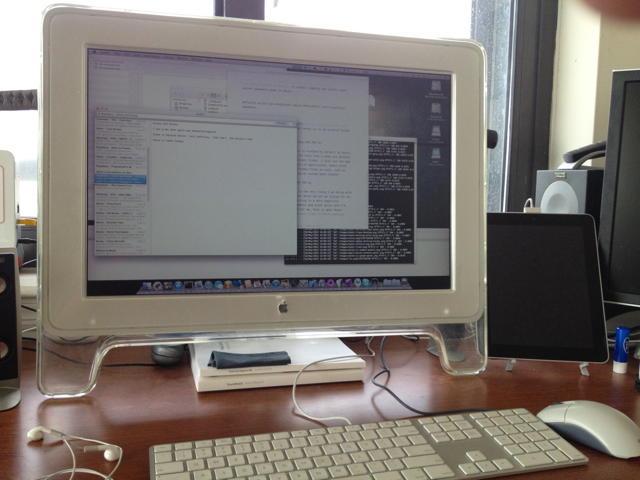
I use an ADB to DVI adapter to connect it to the Mac Pro. I love its matte screen, 1080p support and the fact that I have to prop it up using old Final Cut manuals. It still works great, though.
Automatically Managed Files
I’m moving back to the desktop for a while to do some iOS programming. Many of the files on my laptop are auto-managing, so as I am moving the process, I thought I’d share how they are automatically managed using Hazel from NoodleSoft.
Hazel is a background process that monitors folders and executes automated actions on matched files. Once a rule is created in Hazel, I can forget about what I have to do and Hazel takes care of things for me.
US Aircraft Embarkation Etiquette Failures
I just returned from a European vacation which involved flying in several aircraft from a wide variety of airports. Over the past few years, I have flown throughout the USA on local carriers and there are many things about the local embarcation experience that leaves a lot to be desired. Here are some of my annoyances, with proposed solutions as usual.
Recent Travels and Tech
My wife and I have been on vacation the past two weeks, the real vacation kind where you go to exotic places and are too busy seeing, trying, doing, eating and drinking things to keep up with email, tweets and blogging. We travelled to three European destinations with four iPhones, two iPads, a MacBook Pro and two plug adapter sets. Here’s how they performed.
The MacBook Pro
I brought the laptop along “just in case” I needed to jump in and fix any software issues while away. It was a stupid decision as I only turned it on once to backup my camera SD card (I have an iPad camera connection kit that could do it, but left that at home). The laptop was a bulky, heavy item that had to be removed and replaced at each border post and was never needed.
Application Context Packs
When developing in Rails, I use a certain pack of applications; when coding for iOS, I use a different pack of applications; and when in a blogging context, I use a third pack of applications. And then there is the regular set of applications that I usually leave running. Starting and switching between these contexts used to take time, until I found a better way.
The Old Way
After a clean reboot, I would then have to go through the same dance every time, launch the regular applications manually. Start Mail.app, OmniFocus, Billings, nvAlt, Twitterrific, Reeder, iChat and Skype, waiting for each to launch before clicking the next one.
My iPhone Home Screen
I have noticed of late a trend in people or sites showing off their iPhone home screens, the first page on your iPhone with the dock, and explaining why they rearranged the applications and icons. Some have even moved the Phone.app off their home screens.
They are all doing it, so it must be cool.
My home screen on the iPhone is factory original. All the applications are exactly in the same place that Apple put them when the iPhone was first set up. Much cooler. Why? Two reasons.
Why Scope Creep is your fault
Christopher Butler writes in Why Scope Creep Is Your Fault (And What You Can Do To Prevent It):
Scope creep is like slowly loading up your plate with little portions of everything on the buffet until you realize man, this plate is getting heavy and omigod I can’t eat all of this, what was I thinking!
In essence, it’s just as much how we manage our clients as how we manage our work. Great article.
This Industry Is Full Of Crap
Lovely rant by Amber Weinberg in This Industry Is Full of Crap:
We get to do something that regular people can’t understand so we’re think we’re cool. We’re not.
And I’m right with her on this too:
I love the fact that as a freelancer, I can choose who ever I want to work with – both in terms of clients and other freelancers.
Microsoft did not always suck
I was a Mac when Apple was beleaguered. Those were the days when Microsoft was in ascendancy, this new Blackberry thing was cool and Google was just a search engine. It’s traditional, and expected, for us Mac people to outright disparage Microsoft and all its products as things that suck. But the reality is that Microsoft has made some pretty amazing products in spite of its size, bureaucracy and inertia. These are some of the things I think they did just right.