
You’re the Advertisement
It used to be said that:
If you pay for a product, you’re a customer. If you don’t, you’re the product.
Now its getting worse. The new Instagram Terms of Use make you the advertisement for any unknown third party product. Anyone can pay Instagram to use your user name, your image, and your photos to advertise their product to anyone else, without your knowledge or consent.
- Some or all of the Service may be supported by advertising revenue. To help us deliver interesting paid or sponsored content or promotions, you agree that a business or other entity may pay us to display your username, likeness, photos (along with any associated metadata), and/or actions you take, in connection with paid or sponsored content or promotions, without any compensation to you. If you are under the age of eighteen (18), or under any other applicable age of majority, you represent that at least one of your parents or legal guardians has also agreed to this provision (and the use of your name, likeness, username, and/or photos (along with any associated metadata)) on your behalf. Instagram Terms of Use
It seems there is no way to prevent this.
Gun Control does Work
Personal note: I have lived in the USA for 9 years now, and think this place is magnificent. Two days ago, in Newtown CT, 20 children and 6 adults were massacred. The dark side of America that is in denial about gun violence, that refuses to even discuss gun control, that treats massacres as a normal and regular part of life, a country that gives up its civil rights over a single terrorist act, but takes no action on a score of massacres of its children, well, that just scares the shit out of me. Whether you are religious or not, parent or not, patriotic or not, surely we can all agree that we can and should do everything in our power to prevent this kind of horror. It can be done, it has been done elsewhere, lets make it happen here.
De Fault with Default
The word default has many meanings:
- To a geek means the value set for a preference by the developer, as in “the default value for the web server port is 80”.
- To a finance person means the failure to fulfill an obligation, like pay off a security, as in “the company’s corporate bond is in default”.
- To a sports person means the failure of a team to arrive in time to participate in a sports match, thereby losing the match, as in “Qatar lose the soccer game by default to Uzbekistan”.
- To a lawyer means the failure to appear in court, as in “an order for default as entered in case XYZZY”.
- And to everyone else means “De Fault”, as in “the replacement ref’s incompetence is de fault of the league.”
Just a quick reminder to ensure you use the right terms in the right context for the right audience.
On Customer and Developer Entitlements
en·ti·tle·ment /enˈtītlmənt/ Noun The fact of having a right to something, or the amount to which a person has a right.
There has been a huge amount written this year about software pricing, availability and support, especially in light of the “race to the bottom” pricing and lack of trials and upgrade pricing in the Apple App Stores. Developers feel they are entitled to more money and respect for the effort they put in, customers feel entitled to free upgrades, multiple platforms and cheaper prices. Yet the discussion has quickly gotten off topic in the incessant white noise of name calling and the use of words like “greedy”, “double-dipping”, “unfair” and “angry”.
Forced Arbitration and the Right to Sue
One of the things that is bothering me these days is the number of vendors changing their contracts unilaterally to require us to use their own arbitration and giving up our right to sue. You can ‘opt out’ of this change, where ‘opt out’ means they will immediately terminate service. The mobile carriers in the USA have had these for a while, as have the credit card companies and many employers. Paypal is implementing it now.
Apple, Please make a Touchscreen Laptop
I think Sean Hollister gets it right in The Verge article Surprisingly, touchscreen laptops don’t suck. In short, Windows 8 challenges the idea that they do not work, and proves that they do.
The argument against touchscreen laptops and desktops has always been Gorilla Arm, the idea that users will get tired holding their arms up in the air for longer interactions, they will look and feel like Gorillas.
But the theory of Gorilla Arm only makes sense when you consider it for longer interactions (for example typing or drawing). Hollister, in his article, points out that Microsoft as proven that for shorter interactions (launching, navigating, selecting), touchscreens work great. And I agree.
Bills Doubled in 8 Years
While shredding old, unnecessary paperwork today, I noticed that the cost of our monthly utilities have more than doubled in 8 years, yet almost nothing in our way of life has changed.
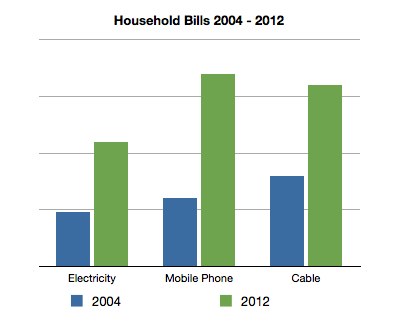
We live in exactly the same apartment. We still have no kids. We still have only 1 TV, but the new one uses less juice. We both use modern laptops and iPads, which also use less juice, so our monthly kWh has not gone up, but our power bill has more than doubled.
Yahoo Finance Logger for Slogger
One thing I find myself doing every once in a while is trying to find out the $AAPL share price for a given date. This usually requires a trip to Google Finance or Yahoo Finance and a need to download a data table to find what I need.
Wouldn’t it be nice if this information was in my journal?
So I spun up a simple Slogger plugin to do it. This plugin:
Inbox Kinda Zero
The idea behind Inbox Zero is to manage email overload. Basically, you aggressively process your email inbox by
- Deleting everything you don’t need, want, care about, don’t care about, couldn’t be bothered with or is too old to act on.
- Respond and file what you can process quickly.
- Queue, by filing, emails that you need to get back to.
- Schedule tasks and time to process the queue folder.
With Inbox Zero, if there is an email in the inbox, it needs to be processed away. The intention is to help you minimize the amount of time spent in email.
Back to Byword from iA Writer
For as long as it has been available, I have been using Byword for writing in Markdown. All blog posts, all knowledge base notes, all written using Byword. But I really liked the look of iA Writer, so I made Byword’s font look more like iA Writer’s (see Text Editing Fonts and Colors). Perfect.
I even started a “why I prefer one over the other” post, but it only contained one item:
* Prefer the font size in Byword (too big in iA Writer)
At the beginning of November, iA Writer for Mac was updated with their new responsive design, which varies the font size based on the window width. Perfect, the font was no longer too big when the iA Writer window takes up the left half of my 15” display. So I switched the default Markdown editor over to iA Writer.