
Assembly Notes
Assembly Notes are documentation that a programmer creates to record all the steps they go through when crafting an application, setting up a new server or configuring a new device. The idea is to log all the things they do and all the commands they type in so that they can reproduce the process again later. Assembly Notes are personal or project internal, not shared.
I started writing these when I launched Noverse, and use them on all projects. I have notes for each step I performed when creating each application, more notes for how all servers are set up and configured and even notes on how the development environments are set up. In my case, I break these up into weekly files by project, store them in my standard project folder’s Notes folder and use these logs as the source when reporting progress to clients as well.
1GHz Titanium PowerBook
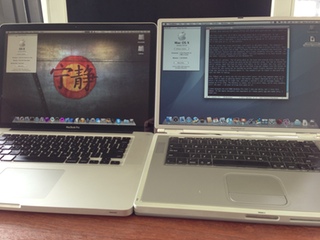
It was about this time 10 years ago that I purchased my precious, a 1GHz Titanium Powerbook from a back street store in Akihabara (Electric Town) in Tokyo, Japan. I bought it based on a single viewing of another PowerBook because it ran UNIX with a GUI. Oh and it was thin and fast and beautiful.
It surely is the best device I ever owned.
I had been a Mac user in the early 1990’s, but, like most, I moved over to Windows for work. The Mac hardware had been falling behind, the operating system was sluggish, and the Dell/Microsoft combination was cheap and cheerful and necessary.
Mind hacks
A lot of people, including myself, talk a lot about organization, productivity and life hacks that make things run better for us, and share it with others. But on a more personal note, some of us also need additional hacks just to function normally in normal situations.
I call these mind-hacks, tricks that enable people like me to function and get through the day. Without them, our minds just spin off in a hundred directions and we get nothing done.
Be Organized and Productive
The theme of 2012 was all about getting organized and productive using software. I may have spent 2012 developing Kifu and some internal applications for clients, but I spent a lot of time this year getting better organized and more productive on my Mac. It’s ridiculous how much this has paid off.
So, instead of a cool-products-of-2012-year-in-review post, here are many of the things I do and tools I use to be organized and productive, with thanks to those to shared the ideas with us. Maybe these ideas, tools and folks can help you too.
2012 Year End iPad Essentials
I posted my 2012 iPad Essentials (excluding games) in March this year when the iPad 3 came out. Since then, the iPad 4 and the iPad mini have launched. Surprisingly enough, the early 2012 essentials (excluding games) have changed very little:
New Additions
- The Magazine - Technically not an app, The Magazine is a brilliant new take on how a magazine should work, with great writing on a wide variety of interesting topics.
- NetBot - Joins TweetBot at the top of my most popular apps page. I trust you will all join App.Net and follow me there. I find the level and depth of conversation on App.Net so much better than Twitter.
- 500px - to show off my very best pictures. Better go out and take some more.
- Paper by Fifty Three - has become my go-to drawing and scratchpad app, it’s unique take on pens and color is amazing. I find myself spending more time in design just because this app creates such good looking sketches.
- Tweet Library - to save old tweets that did not make it into DayOne via Slogger.
- Pinbook - to access my links saved on Pinboard.
- Diet Coda - for writing code and fixing up static web sites, replacing Textastic.
- Pythonista - to help me learn Python programming.
- iStat 2 - To remotely view the performance of my servers.
- Quotebook - For quickly saving great quotes I find while reading.
Updates
- Day One - has become more important as I now use Slogger to record daily social network interactions, site stats (my own plugin) and stock prices.
- 1Password - great makeover of the best password manager in existence.
Old Favorites
- OmniFocus - for all my to-do and project needs. One of my top-5 must have tools.
- Reeder - For RSS.
- Instapaper - for offline reading of saved articles.
- Soulver - A better calculation tool, using it more and more for project estimation.
- Elements - (back to it) to view and create notes, and write, replacing Byword.
- TextExpander - I just wish more apps used its expansions.
- iBooks - I still read almost everything in the iPad.
Still There
- FlipBoard - for more news.
- Zite - for even more news.
- Keynote, Numbers and Pages - Just in case.
- xScope Mirror
- Prompt - for SSH access to servers in emergencies.
- Yojimbo
Removals
- Penultimate - replaced by Paper by Fifty Three.
- Skype - I use it on the Mac only these days.
Note: The links above to the App Store are affiliate links, so if you purchase any of these products, I get a few pennies.
CD to Current Finder Path
To open a new terminal in the current Finder path in OS X, you can use the built-in service (See below on how to enable). But if you are already in a Terminal session, you need to leave the keyboard, mouse to Finder and drag and drop the path back. Here’s a trick that gets you to the frontmost Finder path without leaving the Terminal or keyboard.
Add the following to your .bash_profile:
How to Flexify a Class
OK, so you managed months ago to stop yourself from Premature Flexification when creating a class (or someone else did), but now the time has come to add features or flexify the existing feature set of the class.
There are many wrong ways to do this, and I have seen all of them in practice:
- Duplicate the existing class, rename it and add the flexibility to the new class. This sounds great as existing code remains unaffected, but sucks if a bug is found in the original and both need to be maintained.
- Wrap the existing class in a new class (or sub-class it), passing through the original methods, and adding new methods for the flexible class. Replace all calls to the original with the new wrapper or sub- class (or not!). This time, it seems that the maintenance problem above is dealt with, but the code base becomes crufty, and the workarounds in the wrapper start to break.
- Create a new class that has nothing to do with the original and write a new implementation. Great, now you have two problems.
- Extract the class implementation code into a new implementation sub-class, and default the original to use the extracted implementation class. Then create a new implementation class for the new flexibility version and add a method to the original class to enable you to change the implementation. This is why the suicide rate for Java programmers is so high.
Why do people do this? For a lot of not very good reasons. Some do it because they do not own the code, as in they did not write it or do not have permission to modify it. Some do it because they have no idea where the code is being used and are afraid to break something else somewhere else. Some do it because they think they can write a better class. And some do it because it is easy to be lazy and copy and paste code. And some do it because they just don’t have the time to do it right. And some just don’t care.
Free Instagram Ad Image for Advertisers
Dear Instagram,
Feel free to use the below image to promote any product out there on my behalf. It’s available at http://instagram.com/p/TbW5CmjjYx/.
Ok, thanks, bye. ~Hilton

Follow the author as @hiltmon on Twitter.
Premature Flexification
I was sitting down to design an iOS widget to display an analogue clock face for an upcoming app. I wanted to make sure, as we all do, that the widget will work for all scenarios needed by the app. The app needs to display the time in different time zones, given a reference time in a reference timezone.
✓ User defined background image and hand images
STOP! You Aren’t Gonna Need It. It’s my widget for my app, it’s OK to hardcode the image assets.
Depersonalize because you can’t quit
My Twitter stream today is full of people quitting Instagram because of the new Terms of Service, see You’re the Advertisement. Six months ago, it was Twitter, and six months before that it was Facebook. Quitting over privacy.
Except they didn’t quit. They are all still on Twitter and Facebook and will remain on Instagram, because we, their friends are still there and the service remains awesomely useful.
If you are worried about privacy, but wish to remain on these services, just depersonalize. Turn off locations, use a login and display name that is not yours (but your friends will recognize and accept), remove or fake the remainder of your data, and never post photos of yourself, friends and family. Let these services use your depersonalized data however they want, because it’s not you. A falsely advertised recommendation from “xyzzy68000” means nothing compared to a real recommendation from “hiltmon”.