
On Ihnatko Switching to Android
Andy Ihnatko (@ihnatko) is writing one of his usual clear and cogent articles on his choice to switch from the iPhone to Android at TechHive, see Part One and Part Two.
Good for him.
But somehow the haters have come out in droves, even though Andy himself tried to head them off at the pass:
This isn’t the story about how Apple has lost its way and no longer innovates. It hasn’t and it still does. This is merely the story of one dude who got a new phone. Nonetheless, my tale presents a picture of the strengths of modern Android.
TimeToCall Demo Video
In preparation for the massive PR campaign that will never happen, I created a demo video of TimeToCall, showing off the new “drag down slider”, and added it to the product page. I am hoping v1.0.1 gets approved soon so you can all play with time.
Why make a Video?
- There is no trial on the App Store, so the next best thing is a quick video to help people decide whether the App does what they want. A lot more purchase decisions are made if the potential customer can see a video before they buy. The purchase seems less risky to them and they know what they are getting in to.
- The press gets so many emails that they too have no time to read all the text written about a product. But they do have a few minutes to watch a quick video, and that helps them decide whether to keep watching and write about the product.
- Users, unsure on how to use the app, get a quick-reference on how best to use it from the demo.
- Videos are cool.
To make this video, I ran TimeToCall in the iOS Simulator and used ScreenFlow 4 to record the screen, record my voice-over, present my finger as a white button, add the text annotations and edit the clips. This is an amazing product, so easy to use. I also used GarageBand to create the Jazz soundtrack, using the default Apple Loops because I am not a musician. ScreenFlow then handled the upload to YouTube.
Better?
We all seem to spend a lot of time looking for better things, writing about them and arguing that our choices are better than others’ choices of things. These jeans are better than those jeans, this laptop is better that that laptop, this app is better than that app, this coffee is better than that one.
We’re all wrong, what is better for one is not better for all, because we all have different utility functions. We do not need to stop looking and discussing better, the discussion often does help find it, but we need to understand that that what we think is better may not even be on the care-radar of others.
TimeToCall - First Updates Coming Soon
I’ve received some great feedback and a few bug reports on TimeToCall and spent some time trying to make it a better product. The next decision is when to pull the trigger and put the first update through the App Store review process.
Changes
The two big changes I have made so far are a more accurate slider and the time now toggle.
In the original release, I set the time slider to jump to 15 minute increments to make it easier to hit a ‘zero’ time. I did this because I could never get the tiny slider to hit the time I wanted with my own fat fingers. But people did not like it, they felt the slider did not behave very well.
Have a Better Agenda
Many, many years ago I went on one of those corporate week-long training courses to learn how to negotiate. Back then I was too young and too green to learn anything from it except I remember this mantra:
The only way to win against someone with an agenda is to have a better agenda.
At the time, I never quite understood what that meant. I think I have a better handle on it now.
BuyReply: Email, Text, Tweet, Click to Buy
Prior to online purchases, the only innovation in purchasing was credit cards. The move to online electronic purchasing has seen only one more real innovation, 1-click by Amazon. The current online purchasing experience really just replicates the same onerous manual purchasing process that’s been around since money was invented.
Until now.

With BuyReply, purchasing is as far away as an email, text or tweet. Completely frictionless. Completely effortless. Available everywhere.
Here’s how it works. A vendor pops an easy-to-remember email address, SMS number or Twitter handle and a short code, usually a simple word like “LASER” or “DONATE”. You email, text or tweet that code word to the given address and BuyReply sends you a link to register your payment info and shipping details. They then save this in your online wallet for future purchases. Purchase made. That’s it.
Using Twitter and #xpost (Archived)
I think I have finally figured out how I want to use Twitter (@hiltmon) . Given my low follower counts, this works for me.
Note: This post was originally published in 2013 when App.Net existed. App.Net shut down in 2016 and cross-posting is no longer possible.
TL;DR: Follow me on both, no more cross-posting anything except blog post announcements, mute #xpost on one service to prevent duplicates. (Really? A TL;DR here! For an article this short? Where the “Too Long; Don’t Read” is about the same length as the post. Yes Really!)
Gist TextMate Bundle and Command Line
I was having a conversation on Twitter with Shawn Hansen (@geekles) this weekend and he mentioned that Sublime Text 2 has a great plugin for Github Gists, and TextMate 2 was missing this awesomeness.
Not anymore (the Oscars were on).
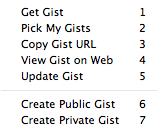
Announcing the first release of my TextMate 2 bundle and a separate command line tool for retrieving, creating and updating GitHub Gists.
The main difference between this and other implementations is that this one caches gist mappings (gist id to file names in ~/.gists) so you don’t have to remember them (and because TextMate 2 has no way to save user attributes on opened files). This implementation also leaves the gist URL on the clipboard for OS X users (which makes it quicker to blog with gists).
Multiple Themes in TextMate 2
One thing I like to do is to have different themes for different file types in my text editor. That way, at a glance, I can guess what kind of file a text-filled window contains, especially when zoomed out using Mission Control. I’ve been using Custom Language Preferences in BBEdit preferences to set up the color scheme for each file type there, and I have set up Multiple Themes in Sublime Text 2 previously.
Glui - a better Skitch
Ever since Evernote purchased and then ruined Skitch (See my Bye bye Skitch, Hello LittleSnapper post), I’ve been looking for a replacement product. A lightweight snap, annotate and save to PNG or share the image app. And I think Glui may be it.
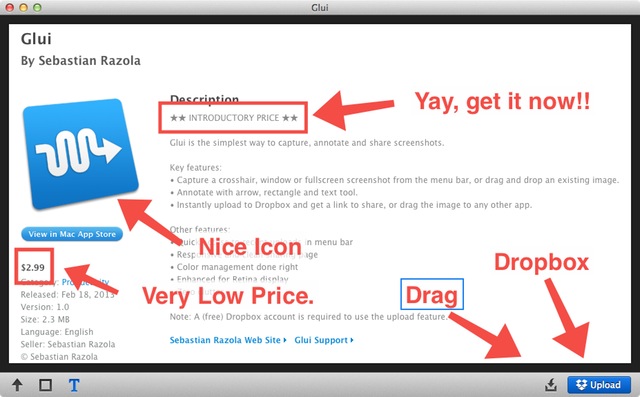
I just wanted an app that just does the following like the original Skitch betas:
- Snap
- Quick Annotate
- Save as image, or
- Share the image
- Go away
Glui, by Sebastian Razola (@razola), does exactly that. It sits in the menu bar, offers keyboard shortcuts for crosshair, window or fullscreen snaps, offers an arrow, box and text annotation in one color (red), with drag to desktop or share on Dropbox. Lovely!