
Top Pages in Status Board
Google has finally deprecated their GAPI interface which this used to talk to Google Analytics, sorry folks, it will no longer work. See the New Google Analytics for Status Board Server Edition for an updated version.
Following up this morning’s Google Analytics for Status Board graph on Status Board, I also wanted a top pages for today view for Hiltmon.com.
See also Hourly Stats and OS and Browser Stats.

The steps are all the same as Google Analytics for Status Board, so follow along, only replace those script and the launcher files with these.
Google Analytics for Status Board
Google has finally deprecated their GAPI interface which this used to talk to Google Analytics, sorry folks, it will no longer work. See the New Google Analytics for Status Board Server Edition for an updated version.
I wanted to see the 7-day Hiltmon.com web stats from Google Analytics on Panic’s new Status Board app. Here is how I got it to work.
Update: For a far simpler install that runs on your web server using PHP, see Google Analytics for Status Board Server Edition.
Google Already Is Big Brother
You can, and probably already do, most of these without paying any money (in no particular order):
- Use Google’s browser Chrome to visit web pages, which tell Google Analytics what you did
- Find information using Google Search, which tracks and saves your searches, search attempts and selections; with the results customized by Google’s model of you
- Jump to your favorite sites using a Google Toolbar extension or built-in search that checks each site you visit
- Send and receive all your personal email via Gmail (and probably work emails too), analyzed and filtered by Postini
- Find out whats going on (and should be going on) in your life and around you using Google Now
- Chat with others on Google Talk
- Schedule your life in Google Calendar
- Maintain your relationships and connections in Google Contacts
- Socialize via Google+ and participate in Google Groups
- Use Google Maps for locating yourself and getting around
- Check in with Google Latitude
- Use a Google phone (Android) for mobile calls, using a Motorola or Nexus handset
- Call internationally using Google Voice
- Read the news via Google News and get your feeds via Feedburner
- Watch TV and other Video on YouTube
- Read books from Google Books
- Listen to tunes from Google Play
- Find a restaurant using Zagat
- Plan you next vacation on Frommers
- Log in to other services using your Google ID and OAuth
- Save and share your personal photos on Picasa
- Purchase stuff via Google Shopper using Google Wallet
- Save your files on Google Drive
- Track your shares and investments on Google Finance
- Click on ads served by Google, DoubleClick, AdMob, AdMeld, Teracent, and AdScape
- Create, edit and collaborate using Google Apps
- Write your blog on Blogger
- Save your code on Google code
- Access the internet over Google fiber (OK, so this costs some money)
- And then there’s bookmarks, offers, iGoogle, translation, alerts and scholar.
Not sure? Click the above links and see how many redirect to a personalized view for you versus a public common page. I was surprised how many were personalized for me.
Is this the end?
The indie business is cyclical, a sin wave of quiet and busy times. The peaks are high and the troughs are low.
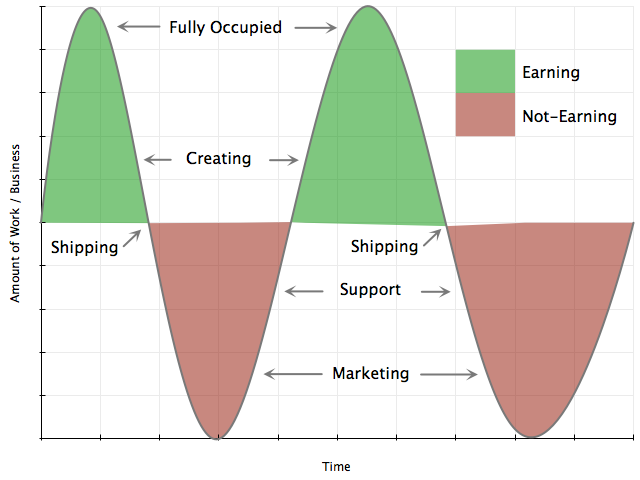
When an indie is busy, there is nothing better, no higher high. They are working with great clients, creating amazing products, solving the unsolvable, slaying dragons and earning enough money to pay the bills.
But when an indie is quiet, there is nothing worse, no lower low. No clients to please, no products to create, no problems to solve, no dragons to slay and no income coming in.
Sharing nvAlt Notes with Ulysses III
I’m testing out Ulysses III for writing and so far I am finding it postively interesting for a 1.0 rewrite. One thing I wanted to try was to use it for notes alongside nvAlt.
Here’s how to share notes between Ulysses III and nvAlt.
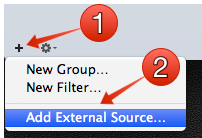
In Ulysses III, click the plus icon on the bottom left (1) and choose Add External Source... (2). Choose the folder in Dropbox where you store your nvAlt plain text notes, then click Open. Note that if you just drag and drop your nvAlt folder into Ulysses III, it will copy all the notes, not reference them.
Go Home
I was talking with a friend the other night about their number one concern with their new job, in that they expect to have to work until 11PM every night and would therefore give up yoga, movies and dating. I almost dropped my drink (which is a horrifying thought for an Aussie).
WTF! NO! Go Home! You work to live, not live to work.
I was that person, the one who worked all hours. During the 1990’s I worked 18 hour days, 7 days a week, for the whole decade. As a result, I was sickly, pale, miserable, lonely and not financially better off. In the noughts, I went home before 6PM every day, got healthy, got a social life, got married, crossed the planet, made an amazing career for myself and had an incredible amount of fun. All because I went home.
Direct Marketing your App to Tip Lines
In TimeToCall - After One Month, I stated that my next marketing experiment would be to send a PR style email to popular press site tip lines to see if they worked. In parallel, and unbeknownst to me, Christian Tietze was doing the same thing, just paying for it (See Sales and AppLaunch.us experience for Calendar Paste, worth a read and reminding me to post this).
The results are:
12PR messages sent (see the actual message sent at the bottom of this post)1delivery failure (so I used a backup address)2robo-responders indicating that the emails were received, thank you0reviews0posts about the product0requests for promo codes0responses0sales
To be clear, I do not blame any of these folks for the lack of response (and I did not really expect any). They get hundreds of PR messages like mine every day. They are good people trying their best to sift through a morass of messy messages to find the gems that would interest and delight their readers. Either my message did not stand out, did not resonate, got nailed by a spam catcher somewhere, or was just not the kind of thing they thought would work for their readership. I’m OK with that because I understand their situation. I knew this going in to the experiment.
$60 million to aquihire me
So this week, Yahoo paid $30 million to acquire Summly and it’s 17 year old founder Nick D’Aloisio (just Google it).
The way I read the deal:
- Summly and its product is going to be shut down. So it’s not the product they wanted.
- Nick only has to hang around for 18 months to get all his money. So it’s not the founder they wanted.
- Summly licensed its technology from someone else, so Yahoo is not getting any IP in the deal either. So it’s not the tech they wanted.
This has to be the most puzzling deal ever!
Oldest Trace of You on the Internet
For a lark, and in response to this tweet:
what's the oldest trace of yourself you can find on the internet?
— Kyle McDonald (@kcimc) March 24, 2013
I started on the Internet in the late 1980’s when it was still called Arpanet. I connected our University of Cape Town UNIX boxes via UUCP to Rhodes University in South Africa which in turn used UUCP to talk to Oxford University in the UK, which in turn connected to one of the Ivy Leagues in the USA. The first message I sent was on behalf of my Professor to Donald Knuth, and we got a response. But all traces of that are gone.
Bjango's Photoshop Actions

I’ve already pointed out that you must have Slicy when working in Photoshop to create and manage iOS artwork or when creating assets for web sites.
The other must have not-so-secret weapon for iOS art is Bjango’s iOS and Android Photoshop Actions & Workflows. These are a set of Photoshop actions that speed up the creation and scaling of iOS artwork.
I start all iOS screen designs using the blue actions that create the necessary blank screen files (they even create a nice status bar). And I test the scaling of all icons using the green scaling actions which scale to all the required and supported sizes.